Launching a new product
inside an existing one
Pristyn Care launched a dental aligner kit a physical product that patients receive and wear over a treatment period. The challenge was integrating a brand new product category into an app built around surgical consultations and appointments.
The aligner experience required two distinct journeys, onboarding new users who had purchased the kit but weren't existing app users, and enabling existing patients to seamlessly access their aligner plan alongside their other care.
New user onboarding
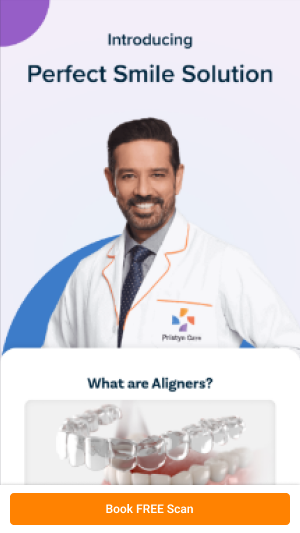
Patients who purchased the dental aligner kit needed a way to sign up and access the app for the first time directly from the guest screen, without the friction of a standard registration flow.
Progress tracking
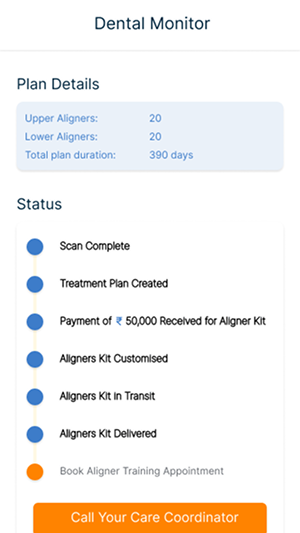
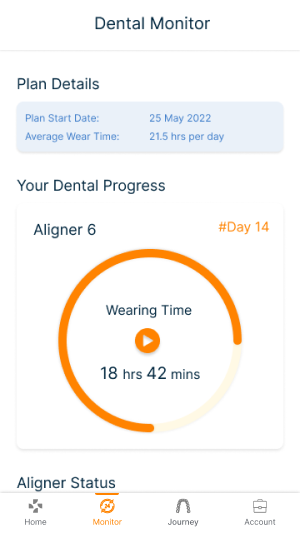
Existing users needed to view their personalised treatment plan and track aligner progress within their existing account, not in a separate app or tool.
Daily monitoring
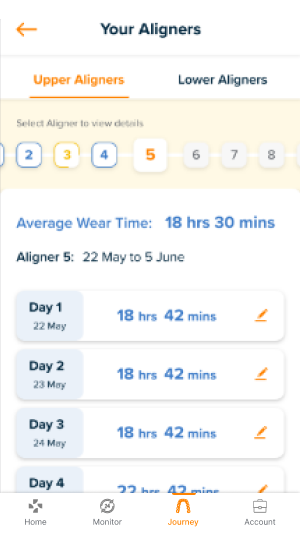
The aligner kit requires consistent daily wear and regular check-ins. The feature needed to make this habit easy surfacing reminders and progress milestones naturally.
App download driver
The dental aligner feature was also a product strategy decision giving existing and new patients a reason to download and regularly open the Pristyn Care app.
Same app, new experience
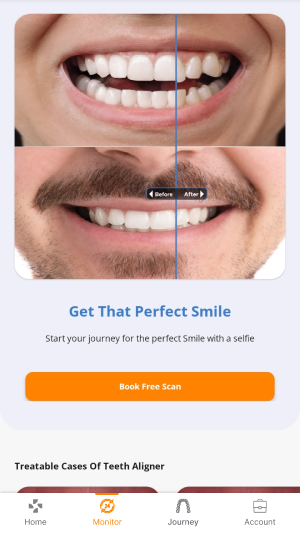
The design challenge was integrating an entirely new product type, physical health hardware with a multi-week treatment timeline into an app whose design language, navigation, and information architecture were built around surgical consultations. The aligner feature needed to feel native to the existing app while being visually distinct enough that patients could immediately find and understand it.
The bottom navigation bar introduced during the wider Pristyn Care app redesign made this integration significantly cleaner, the Monitor tab became the natural home for aligner tracking without requiring any restructuring of the existing navigation.
The final designs
What this feature delivered
Streamlined new user sign-ups directly from the guest screen reducing onboarding friction for aligner kit purchasers who weren't existing app users.
Enabled existing patients to view their complete treatment plan and track daily aligner progress without switching apps or tools.
Contributed to app downloads by giving the dental aligner customer base a compelling reason to install and regularly engage with the Pristyn Care app.
Launched successfully as part of Pristyn Care's expansion into physical health products alongside its surgical care business.